
Companies around the country are recognizing the benefits of remote work, and it isn’t going anywhere soon.
Read on to discover our top techniques for insurance agents who work from home!
Tip 1: Create a Dedicated Workspace
Having a private space as a remote insurance agent where you can work uninterrupted is important for focus and productivity.
Make sure it’s a place where you can set up shop and have access to items you need like:
- Monitor(s)
- A mouse and keyboard
- Notebooks
- Papers
- Pens
Don’t forget to make sure that you’re close to an outlet so you can charge your devices, too.
You can switch your workspace from one room to another if that helps you stay motivated throughout the day.
The keys to focusing are access to materials and ability to concentrate. Stick to those tenants, and you’ll see a boost in your home-office productivity.
We asked our ASG Podcast Producer, Host, and licensed insurance agent, Sarah J. Rueppel, for some home office setup ideas. Here’s what she had to say,

“My desk station isn’t a permanent fixture. Your set up doesn’t need to be fancy. Mine is a place that lets me focus and has enough room for my things. Over time, I’ve come to associate it with getting work done. I’ve drawn a bit of a boundary between my work and home just by creating an exclusive space.” — Sarah J. Rueppel, ASG Podcast Producer and Host
Tip 2: Focus to Minimize Remote Work Distractions
With familiar comforts nearby, staying focused while working from home and time management for remote workers can be a challenge. It’s amazing, though, what you can accomplish in a short amount of dedicated time.
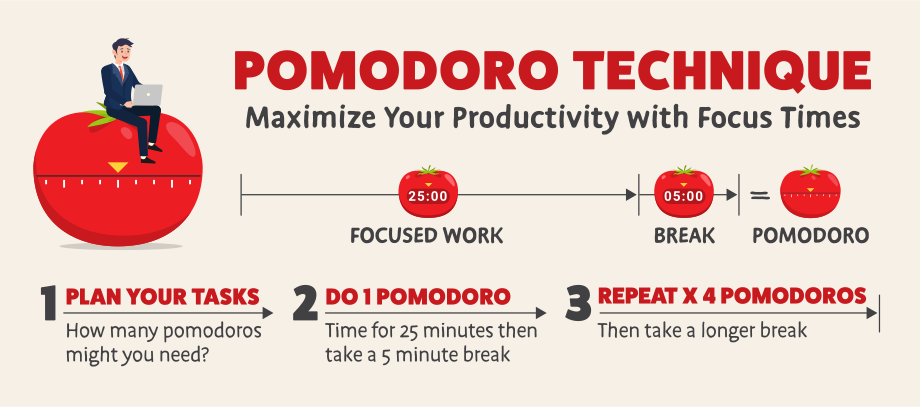
Adopt the Pomodoro® Technique (also known as the tomato timer) to crank out those productive sessions.
Here’s how it works:
- Segment your tasks into 25-minute bursts, separated by a five-minute break in between. That creates one pomodoro.
- Give each period an assignment (e.g., respond to emails).
- If you’re in the zone at break time, feel free to skip it and keep up the focused work.
- Then, take a longer break when you’re ready to be done.
Once you’ve done four pomodoros in a row, take a 15- to 30-minute break. During pomodoros, mute notifications and put your phone on silent. You can even put it across the room if need be!
Ready to be more productive with a cute tomato cheering you on? Head over to tomatotimers.com to track your pomodoros. When selecting which tasks to do, don’t forget to consider when your energy level is at its highest.
“If you’re not the best at deciding which task should be performed when, I personally believe in slaying the dragon first thing. I do the hardest thing on my plate first, the task that’s going to take up the most energy. For me, that’s because I’m a morning person. If you’re the opposite, you might find yourself at your most efficient halfway through your second cup of coffee.” — Sarah J. Rueppel, ASG Podcast Producer and Host
Tip 3: Utilize Technology Efficiently
Working from home means utilizing remote work tools for insurance agents like Zoom, Google Meet, and Microsoft Teams. Learning the ins and outs of these tools will go a long way toward helping your clients do the same during remote presentations. The more comfortable you feel using these tools, the more confident you’ll come across during appointments.
Integrity’s consumer-facing enrollment platform, PlanEnroll, can add a level of professionalism to your presentation as well as provide visuals and streamline the enrollment process.
Before your appointment, take advantage of these handy features of the Client Sync function:
- Gather consumer information (personal and health information, doctors, pharmacies, etc.)
- Obtain permission to contact
- Get a signed Scope of Appointment
During your meeting, you can pull up plan options on PlanEnroll, share your screen, and walk clients through your sales presentation using its useful filter and comparison features. Then, when it’s time to enroll, have your client share their screen and verbally guide them through the application.
Note: Remember, you can’t enroll a client on PlanEnroll on their behalf. They need to be the one submitting the enrollment!
Encourage your clients to share and update their preferences in PlanEnroll seamlessly with Client Sync! Share this guide to encourage your clients to sync their PlanEnroll profile for the best experience.
PlanEnroll works in tandem with IntegrityCONNECT, and any enrollments submitted through your PlanEnroll site will populate in your client files on this intuitive CRM.
Integrity’s technology platform is completely free to use. All you have to do to gain access is become a registered Ritter agent (which is also free)!
Tip 4: Connect with Clients Virtually
Remote meetings change some important aspects of your presentation process like arriving at a location and chatting while getting set up. If those were usually the moments used for small talk and icebreakers, what do you do?
Make room for those moments in a video meeting, too. Don’t get so focused on presenting that you’re not paying attention to your client and interacting with them. Remember, fact-finding through conversation is still how you’re going to learn about your client’s needs.
Think about your client’s communication style. You likely know which clients love to tell and hear stories and which are all business and don’t like small talk. Consider their tendencies ahead of time and tailor accordingly like telling stories of your own.
If it’s a completely new prospect, you’ll likely be able to gauge something about their communication style quickly.
Visual cues are important, so turn that camera on. Without visuals, there’s a lot of meaning that can be misinterpreted during meetings.
Follow these tips to make sure your personality shines:
- Keep your usual tidbits of conversation
- Ask open-ended questions
- Acknowledge what they’re saying as they talk (e.g., nodding along)
- Be a little more animated than normal
- Pay attention to what your face is doing
- Make eye contact with the camera
- Smile and maintain your friendly demeanor
It might feel strange to emote toward a camera rather than another person, but the more you practice and keep with it, the more natural it will become to transmit your personality through the screen.
“Connect with your clients by telling personal stories, adding anecdotes, throwing in a random song lyric or movie quote if that’s your thing — whatever you would do in person. Really listen to what they’re saying, keep asking questions, and remember to take notes! You’ll be able to use that information in follow-ups and meetings in the future.” — Sarah J. Rueppel, ASG Podcast Producer and Host
Tip 5: Rely on Sales Tools & Resources
Meeting and enrolling clients in Medicare or ancillary plans with no face-to-face contact is possible and even easy with the right tools and information.
Ritter agents have access to our proprietary technology and exclusive resources to help them along the way. Of course, it won’t be the same as meeting with someone in person, but you’d be surprised how many clients might prefer it that way!
Integrity’s PlanEnroll
Ritter agents can use PlanEnroll, which is a great tool to use while working from home since it allows you to assist clients in remote enrollments. Agents can start using PlanEnroll by completing a simple sign up for IntegrityCONNECT.
Remote Meeting Tools
If you and your clients still want the ability to see each other, remote meeting tools like Zoom, Microsoft Teams, or Google Hangouts are great options! You can use these platforms in addition to Integrity’s PlanEnroll to give meetings the personal feel that comes with in-person interaction.
Just remember, even though your client isn’t physically in the same room as you, they will still hear and see everything you do on the video call if your video is on and your mic isn’t muted.
Choose a quiet space to hold the meeting to limit interruptions and distractions. Also, make sure you dress appropriately and prepare just the same as if this were a face-to-face meeting. They will still hear and see everything you do on the video call if your video is on and your mic isn’t muted.
Note: These sessions should not be used as permission to contact or to collect SOAs. These tools are only to be used in place of a phone or in-person conversation with your client. Using them for any other purpose runs the risk of not being compliant with the Centers for Medicare & Medicaid Services.
Tip 6: Optimize Selling Insurance by Phone
Phone sales are a classic method of selling insurance, but as every sales today requires more speed and ease, it’s important to be efficient while competitive.
It’s important to have an idea of the plans in your area before engaging with clients over the phone. You don’t want to scramble in the moment.
For fast and efficient plan quotes for Medicare Advantage, Med Supp, Part D prescription drug, and final expense plans, IntegrityCONNECT and PlanEnroll tools are must-haves!
Use a Phone Call Script
Another way to prepare for an insurance sales call is to develop a phone script. When writing your script, make sure to take note of the things you want to say.
Keep your tone friendly and casual, but get right to point of who you are, why you’re calling, and how long the call will take.
It’s also a good idea to jot down potential questions you think the consumer might ask. That way you’re prepared with a confident and accurate answer.
Specifically, selling Medicare Supplements over the phone is a popular option. So, developing a Medicare Supplement call script is a great place to start!
Certainly, you can sell other Medicare and ancillary products over the phone, too! No matter which product(s) you choose, just be sure you’re adhering to CMS and carrier guidelines when selling insurance by phone!
At Ritter, we feature carrier pages, among our collection of resources in Ritter Docs, that outline helpful information for each of our 120+ partnered carriers like their accepted SOA and enrollment methods.
Tip 7: Build Rapport During Remote Sales
Building rapport with someone tends to be easier in person. Your body position, movements, eye contact, facial expressions, and subconscious mimicking/mirroring can all help to make it happen without either of you even realizing it.
However, if you’re talking with a prospect over the phone or online, you aren’t literally seeing eye to eye, which can make it harder for you to do so figuratively as well.
The good news is that it’s still possible to establish rapport if you’re social distancing! We’ll cover six ways to build rapport while selling remotely below.
- Be punctual
- Be prepared
- Be personable
- Be polite
- Use reflecting and clarifying
- Don’t overpromise or over-reach
“Small talk might not be your thing, but it goes a long way toward building rapport when you’re remote. Greet your guest with a smile, ask how they’re doing, and then listen to their answer. Take a moment to be human, don’t just jump straight to business.” — Sarah J. Rueppel, ASG Podcast Producer and Host
Go Forth and Sell…Remotely!
Hopefully, you now know what you need to feel comfortable with working from home and prepared to succeed remotely.
Whether you have to work from home due to an uncontrollable circumstance or you’re remote by choice, be confident that your business can flourish no matter where your work setting is.
If you do happen to run into any roadblocks, Ritter is ready to help you work around them! Registering with Ritter is free and easy and we’re always just a phone call or email away.





Not affiliated with or endorsed by Medicare or any government agency.
Share Post